Find exposed seed phrases and private keys from images
BitShot scans the images on your computer — screenshots, camera roll, downloaded pictures — for seed phrases and private keys, and shows you the ones that got lost.
Linux & Windows · 30-day licence · Monero payments only, no account or email required · Fixed price
Lost and forgotten, but they are still there
You might be developer, researcher, crypto enthusiast, trader or a casual user. At some point you took a photo of your seed phrase. Or screenshotted the wallet setup screen to write it down later. Just for a minute — you'd save and store it somewhere safe and delete the image you took.
But you didn't. It's still in a screenshots folder, a downloads folder, a cloud-synced camera roll, or an old backup drive, buried under years of family photos, memes, and random images you are downloading or taking daily. It's lost among tens of thousands of other images.
It's your wallet and anyone with access to your disk can find it: cloud sync, a shared computer, a repair shop, a stolen laptop. And it's a wallet you can no longer find either.
BitShot was written after I recovered three such screenshots from hundreds of gigabytes of old images — wallets I'd forgotten years earlier, still holding funds.
Point it at a folder. Get back a list of files.
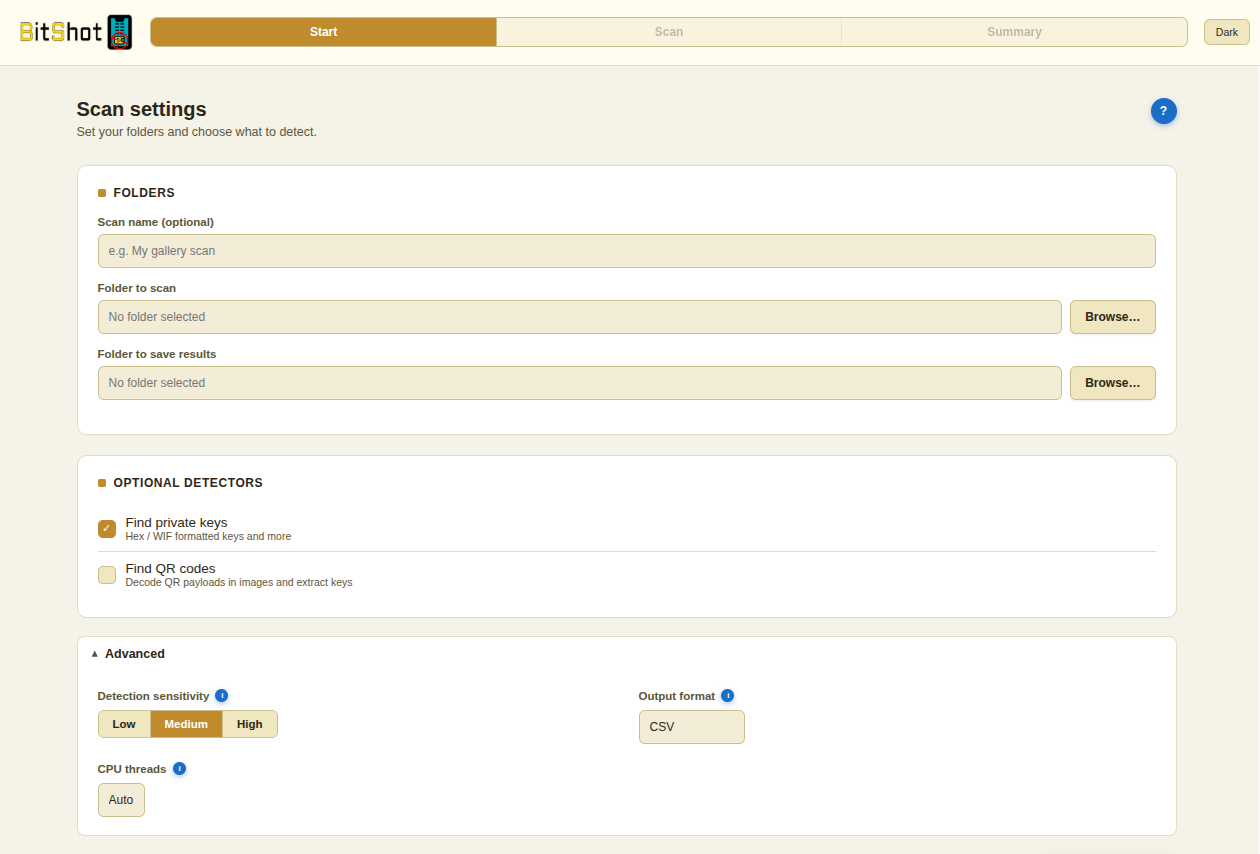
Simple setup: pick a folder, choose what to look for, and let it run.
-
1
It scans everywhere, including subfolders
Point BitShot at a single folder or an entire C:\ drive. It goes through every subfolder on its own — you don't have to sort or organise anything, and non-image files are skipped. Five hundred pictures or five hundred thousand, it works the same way.
-
2
It checks for seed phrases, private keys, and QR codes
Handwritten notes photographed with a phone, screenshots of wallet apps and command lines, typed lists — all of it gets checked. Switch on QR scanning and it decodes those too.
-
3
It's fast enough to run on average machines
Desktop or laptop, BitShot works through thousands of images in minutes rather than hours. It can run on the CPU alone, so no special hardware is needed — an NVIDIA card speeds things up but nothing depends on it. An old laptop will be slower, but it will finish.
-
4
You get exact files
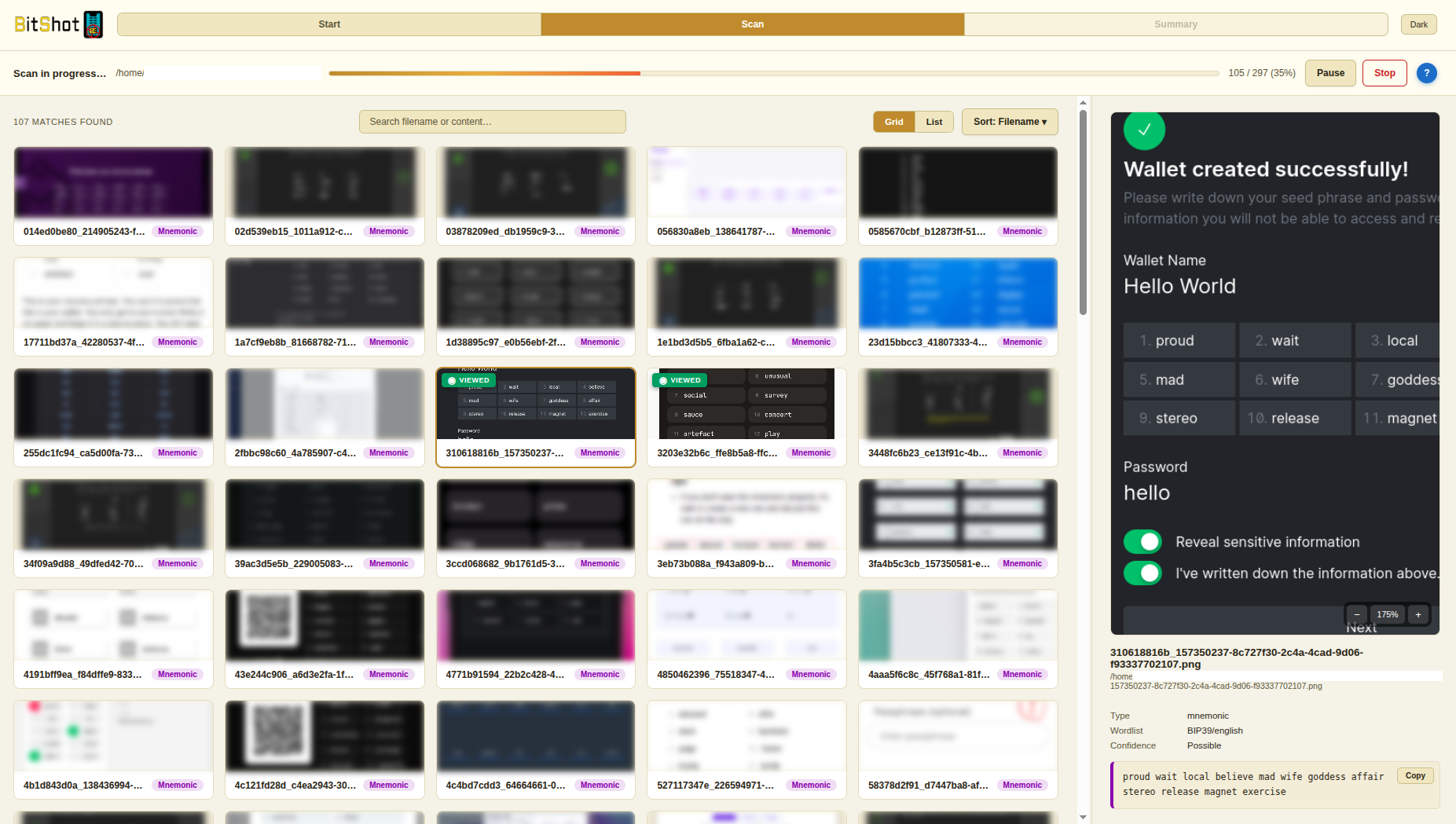
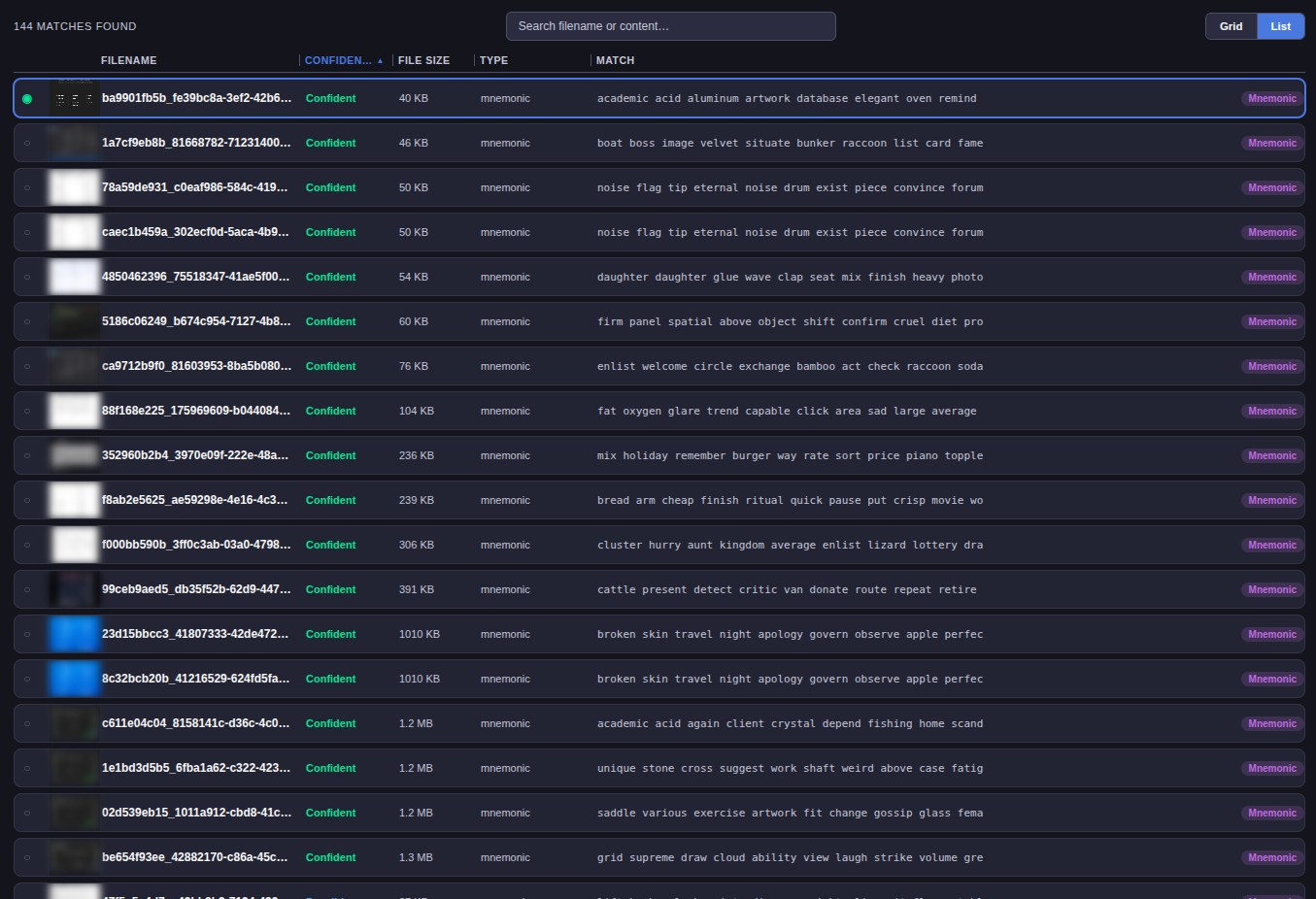
An image only appears in your results if BitShot actually read a valid seed phrase or key on it. What you get back is a short list of exact file paths and names, with previews so you can check the results yourself — in the app, or by opening the files on your disk.
Built to be fast, precise and secure.
Fully offline
Scanning needs no internet at all. Disconnect and run it — everything works exactly the same. The only time BitShot goes online is the one-off licence activation when you first install it.
Precision over noise
The hard part isn't finding images that might contain a seed phrase — it's ruling out the thousands that don't. That's most of what BitShot does.
Formats that matter
Seed phrases of 12, 15, 18, 21, 24, 25, and 33 words — covering Bitcoin, Ethereum, Monero and anything else built on the same standards. Private keys in raw hex, Ethereum 0x format, WIF, encrypted BIP38, and extended keys. Additionally the formats used by Solana, Cardano, Tezos, Stellar, XRP, Sui, Mina and Qubic.
User-Friendly application
Setup, Scan and Results open in BitShot's own window — sortable, with previews, in grid or list view. Go through what it found without opening the images anywhere else.
QR codes too
Some wallets encode your seed phrase or private key as a QR code so you can scan it with another device. Turn QR scanning on before you start and BitShot decodes those too.
Safe and simple purchase
You buy with Monero and get a licence key for a month. When your month is over you come back and buy it again. No registration or email is required.
The app itself.
Fixed price
0.1 XMR / 30 days
Pay securely and anonymously in Monero.
- Full scanning, no limit on library size
- Activates on one machine, up to 3 activations per key (reinstalls, hardware changes)
- Linux or Windows build, by your choice. Updates
- Licence key is your only credential — nothing tied to your identity
Questions you might ask:
How long does a scan take?
Minutes for a few thousand images on an average laptop. A large library on a slow drive can take longer — you can pause it and resume later, and the progress bar tells you where it's up to.
Does BitShot change or delete anything?
No. It reads your images and writes a results file. Nothing is moved, renamed, or deleted. Whatever you decide to do about a file, you do yourself.
It found nothing. Did it work?
Probably, yes — an empty result is the normal outcome for most people, and it's the one you want. The results screen shows how many images were scanned, so you can see it actually looked.
Will it find a photo of handwriting?
Usually. A clear phone photo of a written seed phrase reads fine. Bad lighting, sharp angles, and messy handwriting all make it harder, the same way they would for a person.
Why does it need internet to activate?
Once, to check your licence key is real and tie it to your machine. After that it never needs to connect again — scanning works with the network off entirely.
Why Monero only?
For simple and secure payment, so you can remain anonymous.
What if I lose my licence key?
There's no account to recover it from — the key is the credential. Save it when you get it, along with the order link from the payment page.
Can I use it on two computers?
No, one licence - one machine. You get three activations, so reinstalling or replacing a disk won't lock you out, but it isn't a two-machine licence, you will need to buy 2 licenses for 2 machines.
What happens after 30 days?
Scanning stops until you buy another licence. Results you already have stay where they are, no images or result files will be removed from your machine.